
Renewing your registration for sole proprietorships or partnerships
You must renew your business registration before it expires to continue running it. You can renew up to 60 days before the expiry date.
Last updated on 20 July 2026
Renewal reminders
ACRA will send a renewal reminder letter to your residential address 60 days before your business registration expires. If you have not renewed within 30 days of the expiry date, you will also receive an SMS reminder.
If you did not receive a reminder:
Check your physical mailbox and your Bizfile inbox.
Log in to Bizfile to ensure your residential address and mobile number are up to date.
Before you renew
This guide explains how to renew your business registration to avoid penalties. You can renew up to 60 days before the expiry date and choose a one-year or three-year renewal period.
To check the expiry date of your business registration, enter your entity name or UEN under "Search for Business Information" on the Bizfile homepage. Alternatively, log in to Bizfile with your CorpPass and view the expiry date in your Entity Information Dashboard.
Who may apply
Only business owners can renew the business registration. You can also engage a corporate service provider (CSP) to file on your behalf.
What you need to do
You need to use Corppass to renew your registration. If you do not have an account, apply for Corppass online (opens in new tab).
Please ensure the following:
You have Corppass Admin account (opens in new tab) to login and check your expiry date.
You have ACRA e-services access (opens in new tab) assigned to your account.
Renew business registration
For | You must |
|---|---|
All renewals | You and/or all owners must have made arrangements with the CPF Board to either: • Make your MediSave contributions in full; or • Make your MediSave contributions via monthly instalments Log in to CPF Board's Self-employment dashboard to: • Check your outstanding MediSave payable • Make arrangements for your outstanding MediSave payable. You can choose to contribute in full, or via monthly instalments Note: If you have outstanding MediSave payable, or have not arranged for a monthly instalment plan with the CPF Board for your MediSave payable, ACRA cannot process your renewal and may cancel your registration. |
Three-year renewals | You and/or all owners need to meet any of these conditions to qualify:
Note: If you have met the above conditions but do not see the option to renew your ACRA licence for three years, please contact the CPF Board via Write to us (opens in new tab). |
Fees and processing time
Renewal fees
What you need to know | Details |
|---|---|
Fee (non-refundable) |
|
Payment methods |
|
Approval time | Immediate |
What to do based on your entity status
Use this table to determine whether to renew or restore your business based on the current status of your business entity.
Your Status | What you need to do |
|---|---|
Live (within 60 days before expiry) | Renew (opens in new tab) your business registration via Bizfile. |
Expired and not renewed (within 30 days of expiry) | Renew (opens in new tab) immediately to avoid penalties or cancellation. |
Cancellation in progress | Renew (opens in new tab) immediately to avoid penalties or cancellation. |
Cancelled due to non-renewal | Apply to restore (opens in new tab) your business before renewing |
Cancelled | Settle outstanding Medisave or set up GIRO before renewing. |
Not authorised or unable to access Corppass account | Check your Corppass roles and ensure you are authorised. |
Payment failed or pending | Check the transaction status in Bizfile before retrying payment. |
No longer operating business | Close (opens in new tab) your business instead of renewing. |
Note: It is an offence to run your business after your registration expires. If you no longer want to run your business, close it before your registration expires.
How to renew
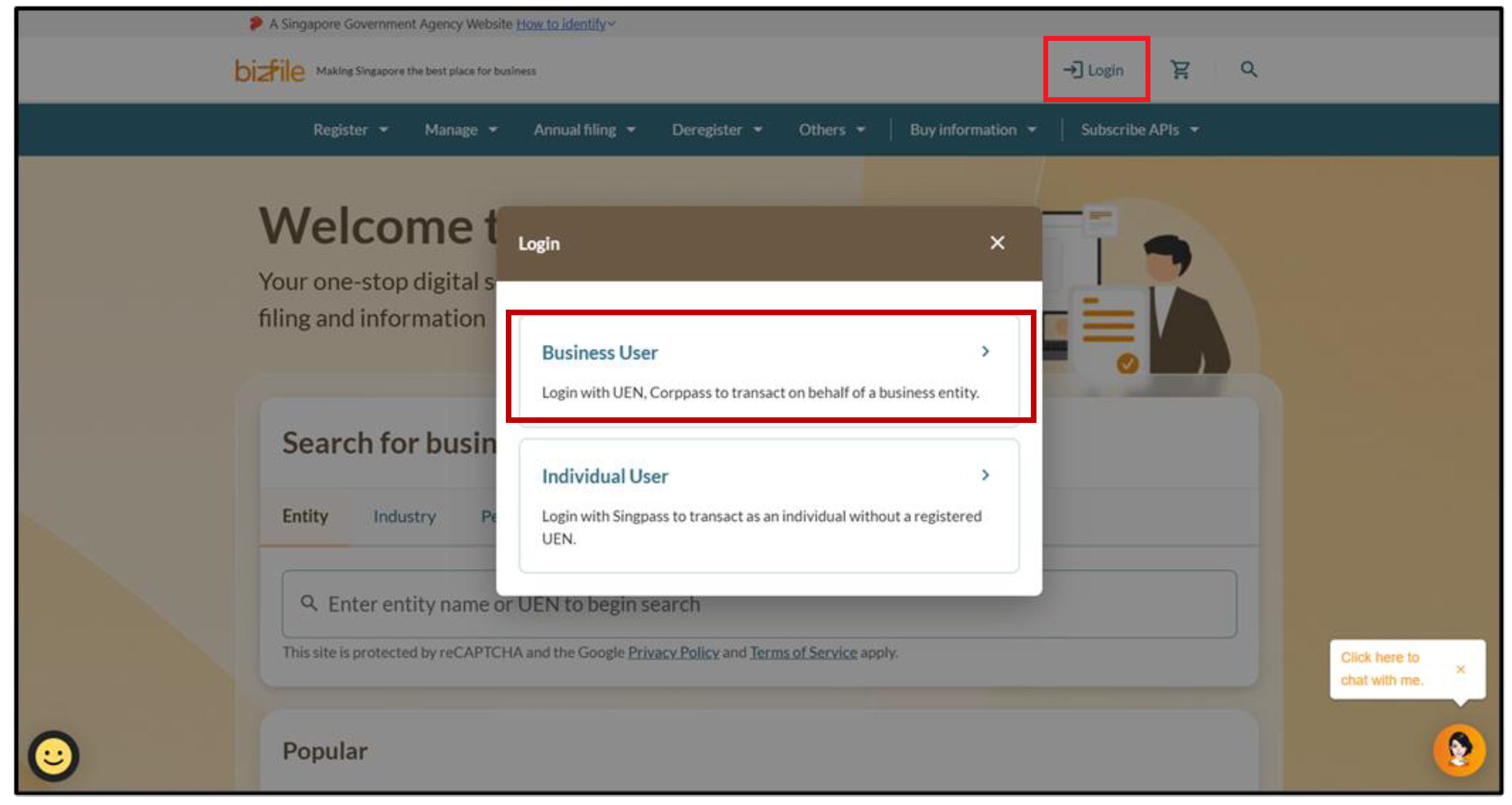
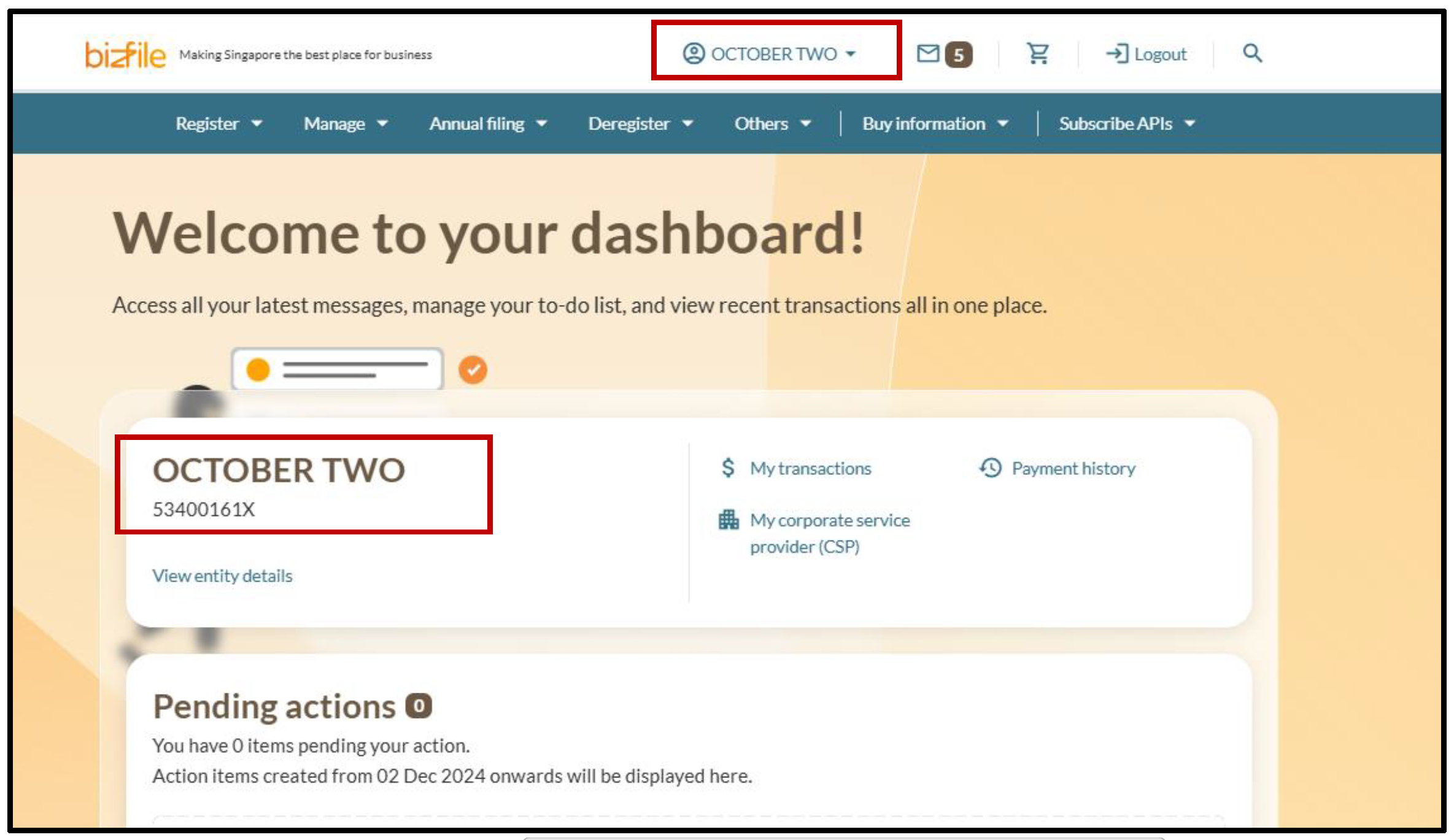
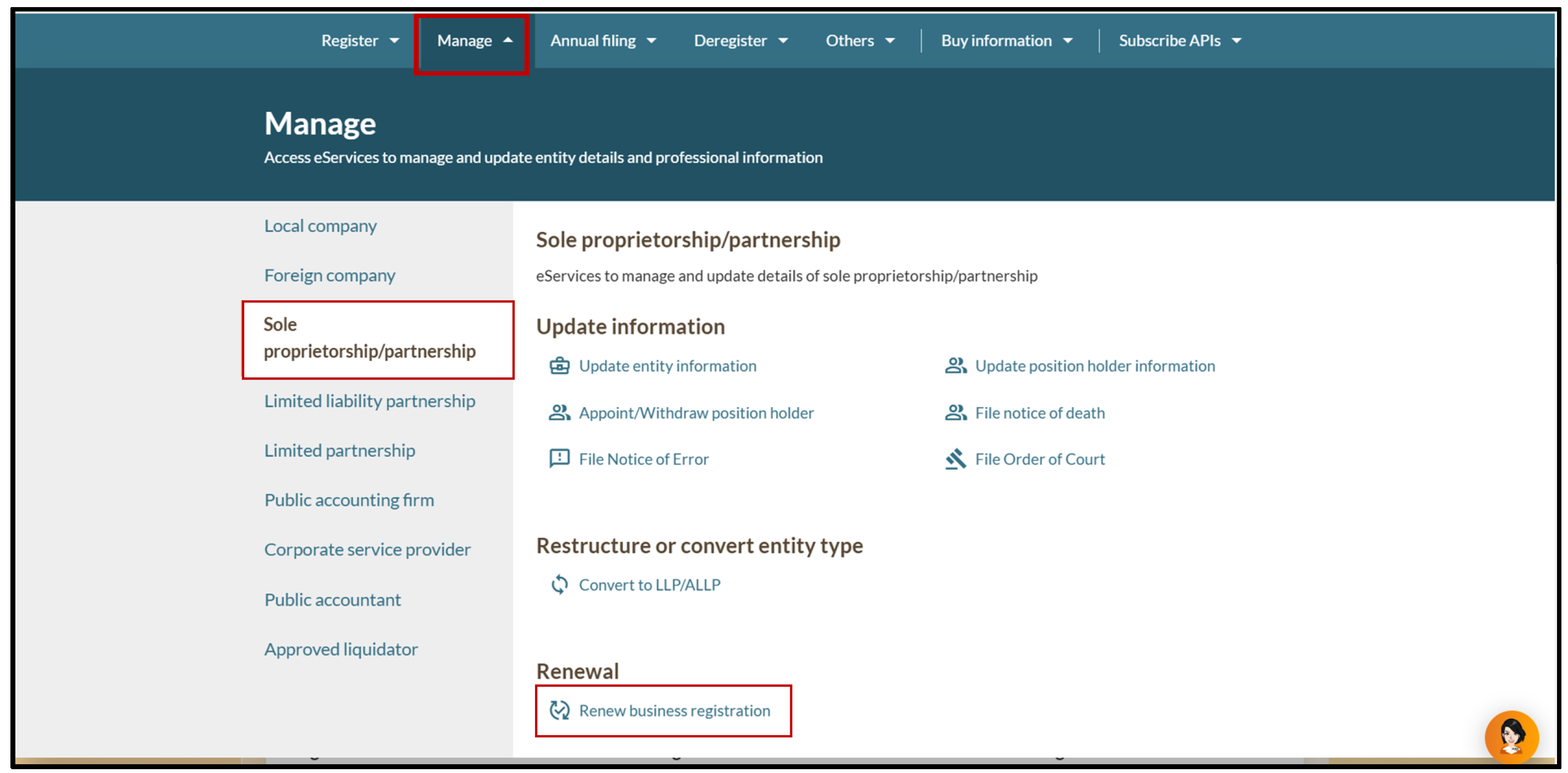
Follow these steps to renew your business registration via Bizfile (opens in new tab).
Note: All entity and personal information (including UEN, entity details, NRIC or FIN numbers, names and addresses) shown are dummy data for illustration purposes only.
Frequently asked questions (FAQs)
Why am I getting a "not authorised to view" error when trying to renew my business?
You need a Corppass Admin Account with ACRA Bizfile access to renew your business registration
What you need to prepare:
Business Unique Entity Number (UEN)
Email address of the person applying
Details of your Corppass Registered Officer (RO)
Check your Corppass access
Even with a Corppass Admin Account, you may get "not authorised" errors if your account does not have access to ACRA Bizfile.
To check your access:
Open the Corppass portal and log in with Singpass.
Select "My Account", then click "View My Profile" and "Assigned e-Services".
Check the "Customised e-Service Access" section to view the services you have been authorised for.
Check the "Default All e-Service Access" section:
If the checkbox is ticked, you have access to all services onboarded with Corppass.
Can I renew more than 60 days early?
No. You can only renew up to 60 days before your expiry date. If you try to renew earlier, the system will not let you proceed.
What if I have not fully settled or am not on a monthly instalment plan for my outstanding MediSave payable with the Central Provident Fund (CPF) Board?
ACRA may cancel your business registration early, and will also not process your licence renewal, if you or any of your business partners have not made arrangements with the CPF Board for any outstanding MediSave payable.
To check your MediSave payment status or make payment arrangements for any outstanding MediSave payable, please visit CPF Board's Self-employment dashboard (opens in new tab).
Why am I still unable to renew after setting up a MediSave instalment or GIRO arrangement?
You must wait for your first successful GIRO deduction before renewing. ACRA's system needs to verify that payment has started.
Timeline: GIRO applications submitted by the 15th of the month have their first deduction on the 25th of the same month. Applications after the 15th are processed the following month. Refer to the CPF website (opens in new tab) for more details on GIRO processing timeline.
What to do: Wait until after your first deduction, then try renewing again. If issues persist, contact CPF and ACRA.
What happens if I renew late?
You may face late renewal penalties.
Please renew as soon as possible to avoid penalties or cancellation.
What happens if my entity is cancelled?
Your entity's registration may be cancelled 60 days after the expiry date.
If your entity is cancelled, you can request to restore your business through the Apply to restore business entity (opens in new tab) eService.
What should I do if my payment fails, is pending, or not reflected during renewal?
Generally, the payment status will be updated immediately. If you need to check on the status of your renewal application, you can view your renewal status in Bizfile under "My Transactions".
If your payment status shows as failed, please retry making payment.
If you have made payment and the status still shows as pending, please write (opens in new tab) to ACRA so we can look into the matter.
After you renew
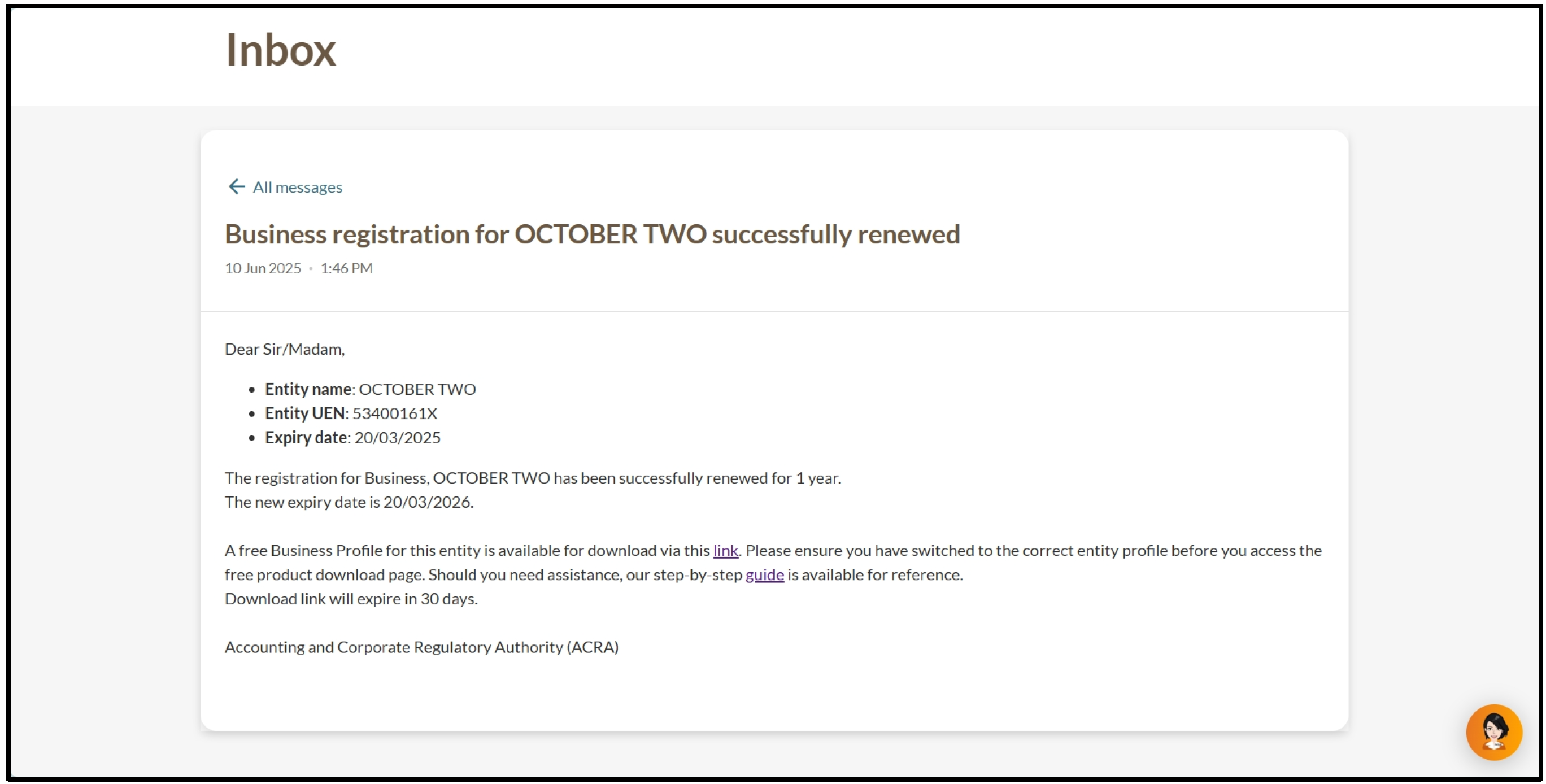
You will receive a free Business Profile in your Bizfile inbox. This report contains your updated registration details.
Download your Business Profile within 60 days, as the free copy expires after this period.